
GuideBeat Extension (Coming Soon)
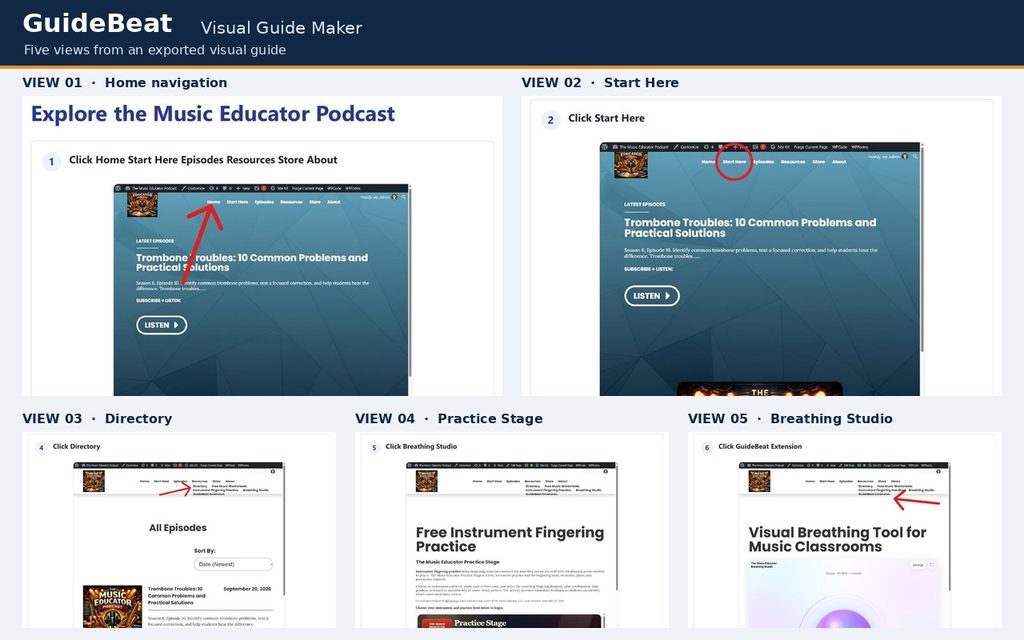
A visual guide maker for educators. GuideBeat records actions in a website tab and helps you build clear, step-by-step instructions with screenshots. It is intended for lesson directions, music technology walkthroughs, and other teaching routines.
Availability: GuideBeat is awaiting Chrome Web Store review. There is no store installation link yet. We will add the official listing here when it is available. The features below describe the current development build and may change before release. GuideBeat is a free tool with no account or subscription in the current build.
What GuideBeat does
1. Start a recording on a regular website tab, carry out the task, pause when necessary, and finish in the editor.
2. Review the steps. Edit titles, instructions, notes, and optional checks; reorder, duplicate, add, or remove steps; and replace a screenshot when needed.
3. Adjust each screenshot’s displayed size or open its direct Crop action. Mark the focal point with an orange dot, arrow, or open circle. Move it and adjust its size, angle, color, and thickness. Use the image editor for arrows, circles, highlights, text, cover areas, crop, and zoom.
4. Export a standalone HTML guide, or choose portrait or landscape and print or save a PDF. Print preview offers a page-fit choice for screenshots. Export an editable JSON backup if you need to move or preserve your work.
Embedding requires you to host an exported HTML guide yourself.
Example: Demonstrate how to open a music technology assignment and find its submission instructions. Check the screenshots, add a student checkpoint, and share only the finished, reviewed guide through your usual teaching platform. GuideBeat does not integrate automatically with a learning platform.
Before you record
Screenshots can show anything visible in the selected browser tab, including student information, account details, and other sensitive content. Use a demonstration account when practical, pause before opening sensitive screens, and inspect every image before sharing. A solid cover area hides pixels in the final exported image, but the original editable image remains in local storage and JSON backups. Do not share an editable backup as a substitute for a carefully reviewed HTML or PDF guide.
Privacy and data handling
The current GuideBeat build saves guide text, screenshots, and editable annotations in local extension storage in the browser profile. It contains no account, analytics, advertising, remote guide service, or automatic upload. The current source has no network upload call. Exporting a guide or backup creates a file that you control; sharing or hosting that file is your choice. The publisher does not receive the guide merely because you record or save it locally. This description applies to development build 0.5.4. Release behavior may change.
GuideBeat handles website content, clicked locations, and screenshots to perform the user-requested recording and editing. It avoids reading typed field values and skips certain sensitive field clicks, but those measures do not remove sensitive information that is visible in screenshots. Recorded guides remain in the browser profile until you delete them or the browser’s extension data is removed. Exported files and backups remain wherever you save them. Deleting a guide in GuideBeat does not delete copies you exported or shared.
The use of information received from Google APIs will adhere to the Chrome Web Store User Data Policy, including the Limited Use requirements. No data is sold or shared with third parties by the current extension code; any file that you independently publish or share is outside the extension’s local storage. Review the site’s Privacy Policy and contact page for site-level practices and questions.
Why these permissions appear
- activeTab: access the tab when you invoke GuideBeat.
- scripting: start recording on an already open page.
- storage and unlimitedStorage: keep locally saved guides and screenshots; storage still depends on available device space.
- Website access: keep capturing the selected tab after navigation without asking for a fresh browser gesture at every page. The recording code runs on ordinary HTTP/HTTPS pages, and recording is controlled through Start, Pause, and Finish. The extension does not record every tab continuously.
These permissions are described from the inspected manifest and README for development build 0.5.4. The approved store version may request different permissions; review its installation prompt. - Limits and help
Recording follows the tab where it began. A new tab opened by a link is not recorded in that new tab. Browser settings, extension-store pages, and clicks inside some embedded cross-origin frames are outside the current recorder’s scope. Fast page changes can leave a screenshot that needs replacement in the editor. Review every step before distributing a guide. - The current build passed automated JavaScript and canvas checks, but live Chrome and Edge recording and the browser print dialog were not verified in the build environment. We will update the installation and testing details when the store version is approved.
Need help or want to report a problem? Contact The Music Educator with your browser, GuideBeat version, and the steps that caused the problem. Please do not send student information or sensitive screenshots. Explore other teaching resources.