
MIDI and Audio Choices
Music Technology Worksheets · Jump to the free PDF
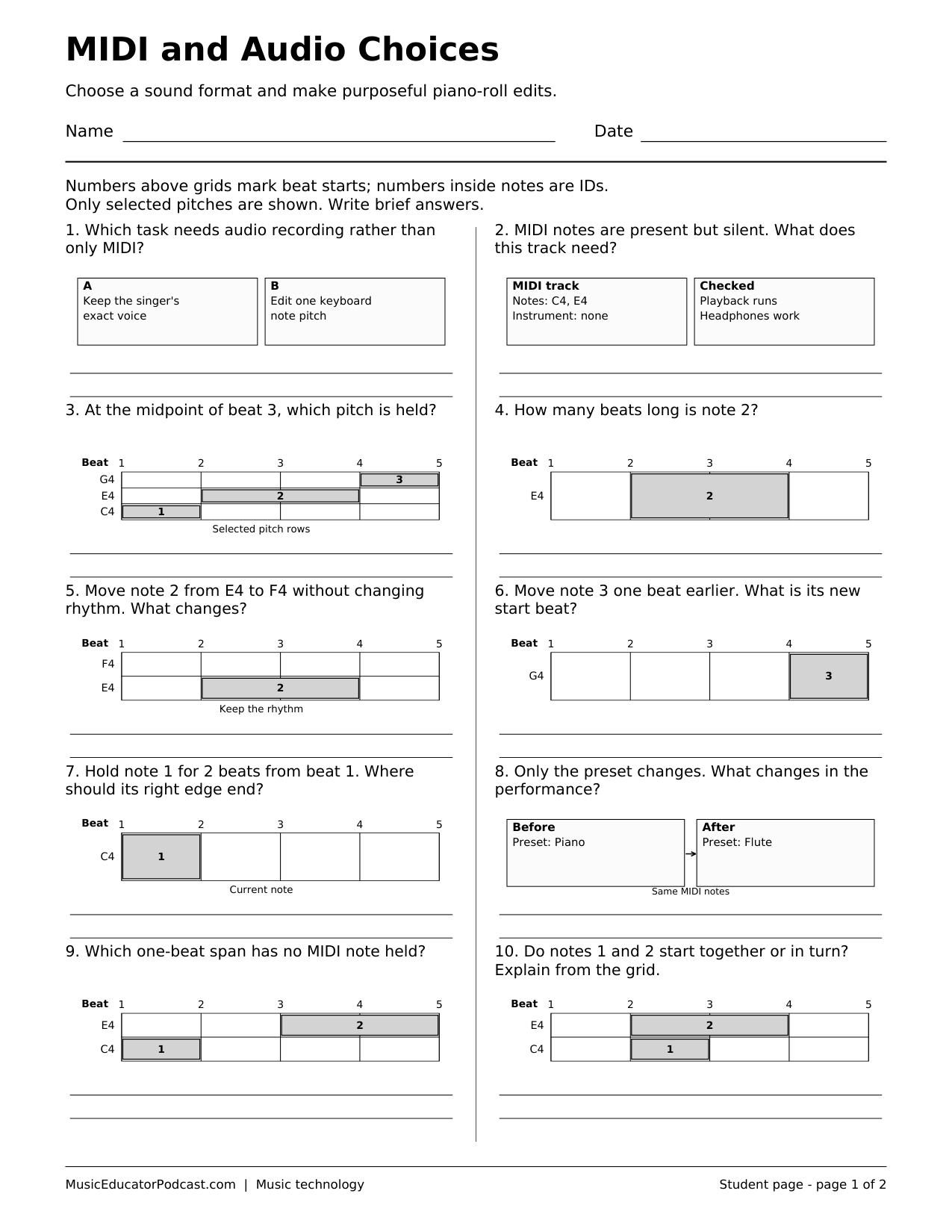
A recorded sound and an editable note pattern may look similar on a project timeline, but they offer different kinds of control. This beginner worksheet asks students to choose a suitable format, read a piano-roll model, and predict what a note edit will change. The two-page PDF contains ten diagram-based questions and a matching answer key.
Download and print
Download worksheet and answer key (2-page PDF)
Print page 1 for students. Page 2 is the matching answer key. The free download requires no account.
One US Letter student page with ten short-answer items, followed by an answer key. Original black-and-white diagrams model note data, audio choices, and editable events.
What students practice
- Distinguish recorded audio from MIDI performance instructions.
- Read pitch, start time, and duration in a simplified piano roll.
- Predict which musical details will change after a targeted edit.
- Choose an appropriate starting format for a musical task.
Classroom use
Use the page before a first virtual-instrument project or after demonstrating a note editor. Students can explain a prediction on paper, then test one change in your approved music software. Keep the note pattern unchanged while switching instrument sounds so students can separate the notes from their sound.
Common questions
Do students need a MIDI keyboard?
No. The paper activity requires only a pencil; an on-screen note editor is optional for testing predictions.
Does this teach a particular app?
No. It uses simplified models rather than screenshots or product-specific button names.
Which page should I print?
Print page 1 for students. Page 2 contains the matching answer key.