
Timeline Detective: Read a Multitrack Arrangement
Music Technology Worksheets · All Free Music Worksheets
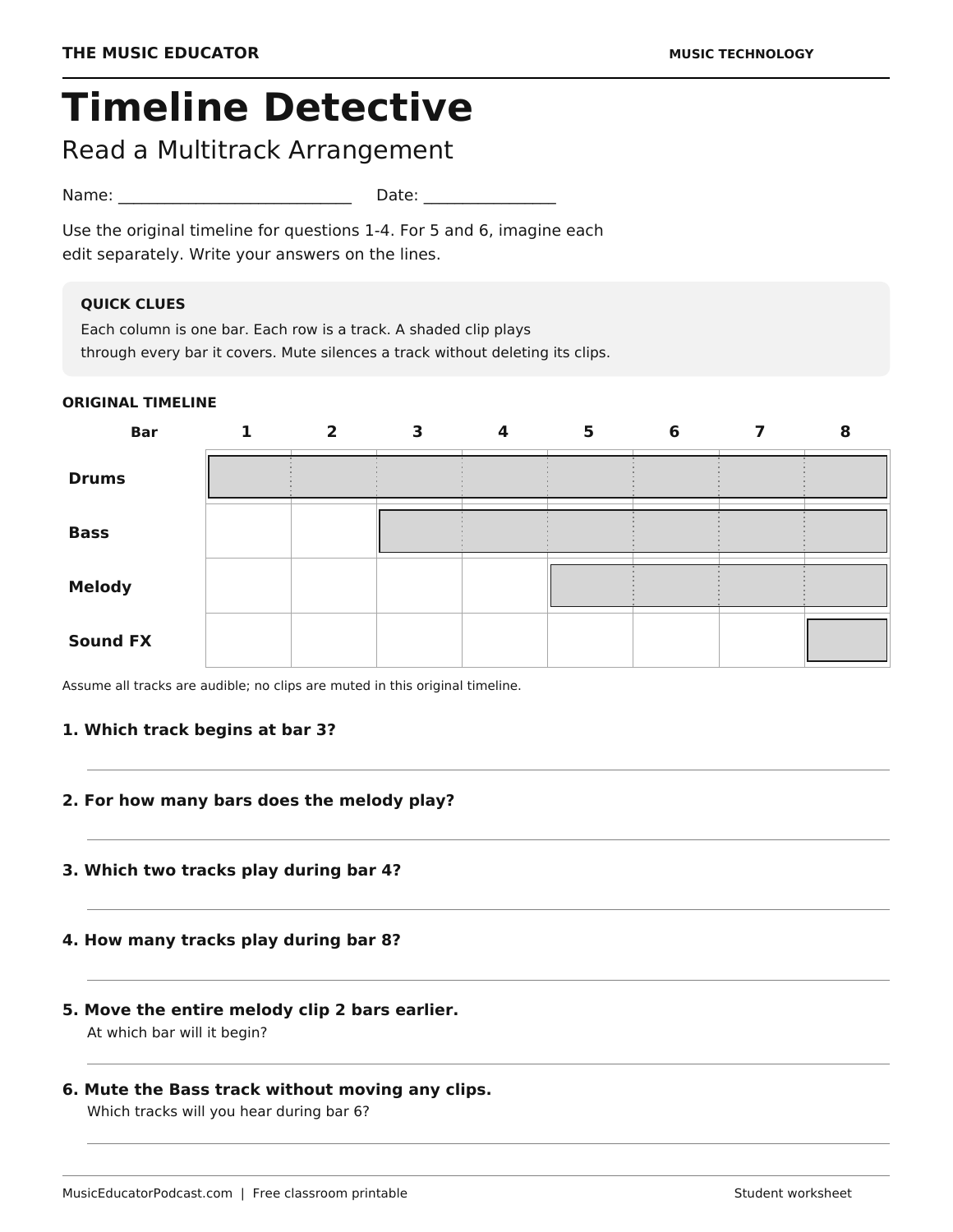
Timeline Detective helps beginning music producers read a multitrack arrangement before opening a recording project. Students follow an eight-bar timeline with drums, bass, melody, and sound effects, then answer six questions about when clips play and what changes when a clip moves or a track is muted.
Download and print
The student version is one page. The complete file contains the student page followed by the answer key. Both are US Letter and black-and-white friendly. Print only page 1 of the complete file for students; use fit-to-page if your printer requires wider margins.
What students practice
- Read track rows and bar columns in a simplified digital audio workstation timeline.
- Identify a clip’s starting bar and count the bars it covers.
- Find which tracks overlap during a given bar.
- Predict the result of moving a whole clip or muting a track.
A short classroom routine
Start by tracing one column from top to bottom: which shaded clips play during that bar? Then trace a single track from left to right to find where its clip begins and ends. Students complete questions 1–4 using the original timeline. Questions 5 and 6 are separate imagined edits, so students should return to the original diagram before each one.
When reviewing, distinguish moving from muting. Moving a clip changes its position on the timeline; muting silences the track without deleting or moving its clips. A useful follow-up is to build the four-track layout in your class DAW and compare what students predicted with what they hear.
Common questions
Do students need a computer or a DAW account?
No. The printable provides all the information needed. It can introduce a later production lesson or serve as an offline review.
Is this specific to Soundtrap or another program?
No. The diagram is an original simplified teaching model, not a screenshot of a particular app. The skills transfer to a multitrack DAW, although interface labels and controls vary.
Are students counting beats?
No. Each column represents one complete bar. The worksheet asks students to count covered bars and track overlaps, not to calculate beats or interpret a time signature.
Related practice
DAW Basics: Parts of a Digital Audio Workstation introduces interface vocabulary to pair with this timeline-reading activity.